
Halloween is the season of tricks, disguises, and things that are not quite what they seem. Unfortunately, cybercriminals play the same game all year round. Their favorite disguise? A message that looks completely legitimate. Phishing is a type of cyberattack in which criminals impersonate trusted people or organizations to trick victims into clicking malicious links, sharing sensitive information, or sending money.
The goal is simple: the trick is the lure, and the treat is what the attacker wants to steal.
But phishing comes in several forms, and knowing how each one works can help you avoid becoming part of someone else’s Halloween horror story.
1. Email Phishing: The Classic Disguise
This is the most familiar type of phishing. Attackers send emails that appear to come from trusted companies, colleagues, or services. They may ask you to reset a password, review an invoice, or open an important document. The message creates urgency and encourages you to act before thinking. Some emails contain obvious mistakes, but increasingly convincing messages can be perfectly written.
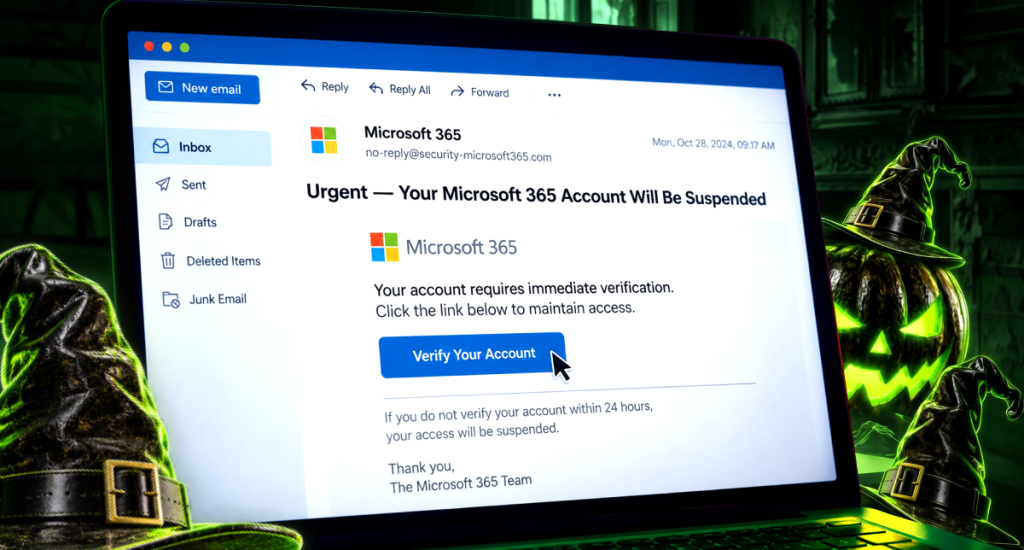
How to avoid the trick: Check the sender, question unexpected requests, and avoid clicking links simply because a message sounds urgent. If something feels off, verify it through a trusted channel.
2. Spear Phishing: A Trick Made Just for You
Unlike mass phishing campaigns, spear phishing targets a specific person or organization. Attackers may research employees, projects, and business relationships to make their messages more believable.
Workplace example: You receive an email that mentions a real project and appears to come from your manager, asking you to review a confidential file. The details seem right, but the sender could be an impostor.
The defense: Be cautious with unexpected requests involving confidential documents, payments, or account access. Confirm unusual requests independently, even when the message includes information you recognize.
3. Whaling: When the Big Fish Is the Target
Whaling is a form of spear phishing aimed at senior executives and other high-value individuals. Attackers often target people with access to financial resources, sensitive information, or important business decisions. For example, a criminal might impersonate a CEO and ask the finance department to make an urgent transfer before the end of the business day.
Red flag: A request to bypass normal approval procedures because the sender claims the matter is confidential or urgent.
What to do: Follow established payment approval processes. No job title should override security procedures.
4. Smishing and Vishing: Tricks Through Your Phone
Phishing is not limited to email.
- Smishing uses fraudulent text messages.
- Vishing uses phone calls or voice messages.
A text might claim that a delivery is delayed and ask you to pay a small fee through a link. A phone caller might pretend to be from IT support and request your password or authentication code. AI-generated voices can make impersonation even more convincing.
Stay safe: Never share passwords or authentication codes with callers. Avoid unexpected links in text messages, and contact the organization using an official number or website when you need to verify a request.
5. Quishing: The QR Code Trap
QR codes are convenient, but attackers can use them to direct victims to fraudulent websites. This technique is known as quishing. Imagine finding a QR code in an office notice asking employees to scan it to update their work accounts. The page looks legitimate, but it leads to a fake login screen designed to steal credentials.
Before you scan: Check whether the QR code comes from a trusted source. Be especially cautious with unexpected codes in emails, posters, or documents. If a code asks you to sign in, verify the destination before entering your details.
Don't Take the Bait
Phishing attacks come in many disguises, but the goal is always to trick you into doing something that benefits the attacker. The good news? A few simple habits can help you recognize suspicious requests and avoid falling into the trap. Here are some common phishing tricks and what you can do to protect yourself.
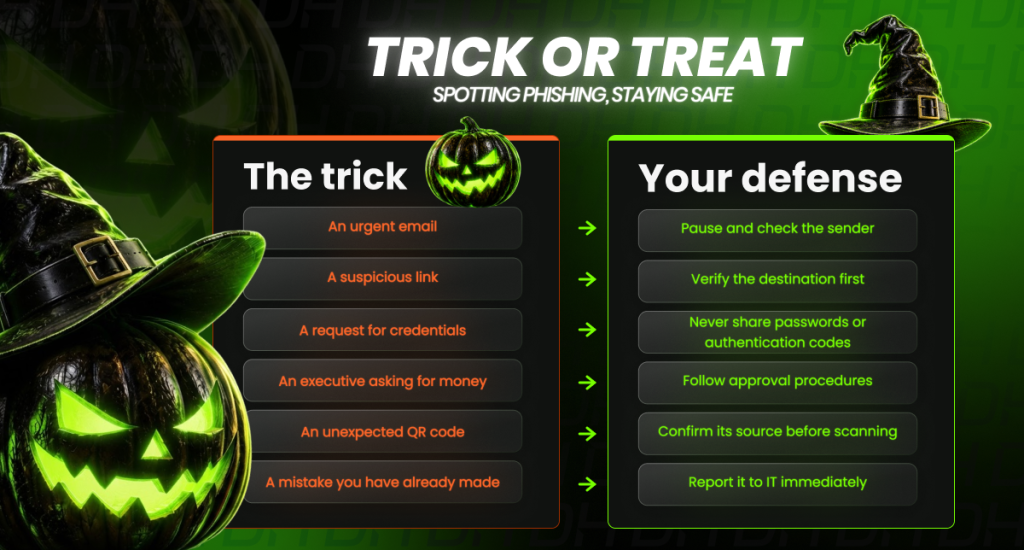
One last thing: You don’t have to be certain a message is malicious to report it. If something seems suspicious, let your IT team know. Reporting it early could help protect your colleagues, too.
Phishing scams work because they take advantage of everyday habits. We trust familiar names, respond to urgent messages, and often assume that a professional-looking email is safe. But even the most convincing message can hide a trick. This Halloween, enjoy the spooky season, but keep your guard up. If a message pressures you to act quickly, asks for sensitive information, or seems too good to be true, take a moment to stop and verify.
Think before you click, check before you trust, and report anything suspicious.