
According to the GitHub Octoverse and Stack Overflow Developer Survey 2024, 55% of developers use AI tools daily, boilerplate generation is twice as fast on average, and routine coding tasks take 40% less time. These figures show that AI has become part of everyday development rather than an occasional productivity tool.
That makes one question increasingly important: are we using it well? Teams have access to many of the same AI tools, yet they often achieve very different results because AI is integrated into their workflows in different ways.
Choosing the right tasks for AI
A good starting point is knowing which tasks are worth delegating. In a frontend workflow, the clearest candidates are the ones that are repetitive, well-defined, and don’t require much context about the product or the user:
- Boilerplate and skeleton code: component stubs, API hooks, form wrappers that used to take 30 minutes now take seconds
- CSS and styling: responsive layouts, Tailwind classes, converting Figma designs to code
- Unit tests: repetitive test cases, mock setup, assertion scaffolding
- Documentation: JSDoc, README sections, inline comments generated from existing code
- Code refactoring: converting class components to hooks, cleaning up patterns that have built up over time
The output on these tasks is usually good enough to review and refine rather than rewrite from scratch, which is where the time saving comes from. Knowing that, the next part is to fit these tools into a workflow that holds up day to day.
Integrating AI into your workflow
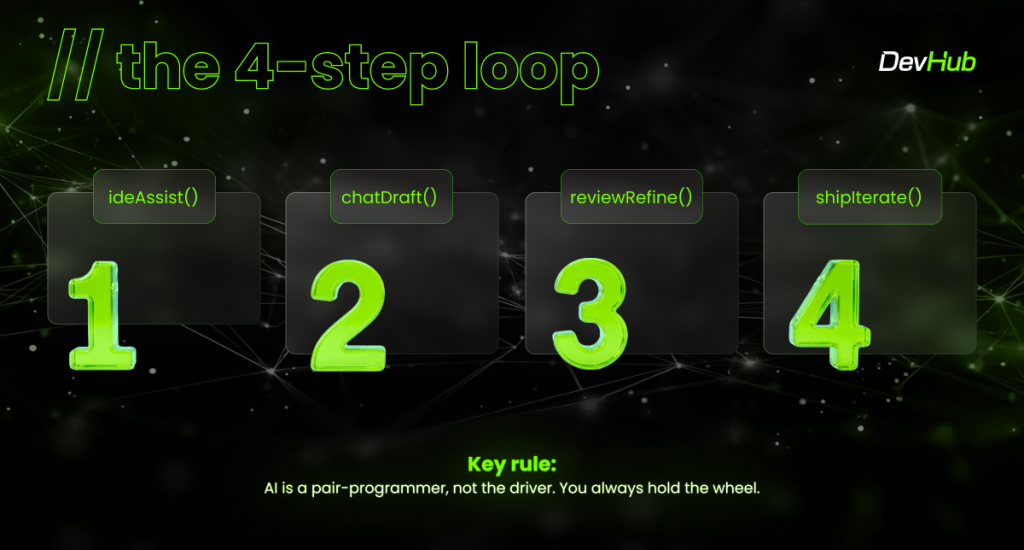
The loop has four steps, and each one builds on the previous.
It starts with the IDE copilot. AI completes code as you write, which removes the constant stop-and-search that breaks focus mid-task. From there, chat-driven development takes over for larger features: describe what you need in plain language to Claude or ChatGPT and get a working first draft to build from.
Step three, review and refine, is where most of the real work happens. AI makes confident mistakes, and this is where they get caught. Read every line, understand the logic, and own the output before it goes anywhere. The fourth step, ship and iterate, brings in AI-assisted PR reviews, test generation, and auto-docs, and then the loop starts again from the top.
Throughout the workflow, AI is a pair-programmer, not the driver, so you always hold the wheel. That matters especially when you get to the parts of the work where no prompt gets you very far.
Where AI still needs a developer
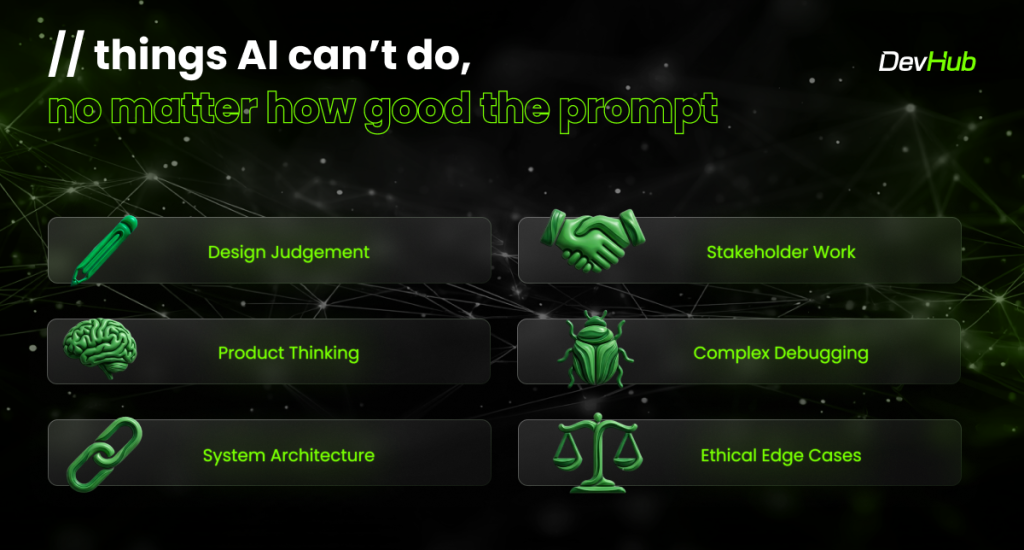
Some things can’t be prompted, regardless of how good the brief is.
Design judgment is one example. A developer can tell when an interface feels wrong even when it technically works, or when a solution follows a familiar pattern without solving the actual user problem. That sense of quality comes from experience and a deeper understanding of the product. Product decisions require the same judgment, because good technical choices depend on knowing the users, constraints, and trade-offs behind the request.
Architecture decisions require a similar level of context. A codebase is shaped by its history, the team’s way of working, and the direction the product is heading. Choosing the right structure means understanding those factors and deciding which trade-offs make sense for the situation. AI can suggest patterns and alternatives, but it does not have the full context behind those decisions. The same limitation appears during debugging: AI can help explore possible causes, while finding the actual root cause requires investigation and a deeper understanding of the system.
There are also parts of the job that have nothing to do with code. Stakeholder work, reading the room in a meeting, negotiating scope, explaining technical debt to someone outside the team, relies on social and professional judgment that no tool can replicate. Building software that works for real people requires knowing who those people are and why the product exists.
Find the right balance
Finding the right balance means being intentional about where AI fits into the workflow. Some tasks benefit from delegation, while others depend on the context and judgment that developers bring.
Delegate to AI:
- Generating test skeletons
- First-drafts components
- CSS utility lookups
- Converting repetitive patterns
- Writing documentation
- Explaining unfamiliar code
Keep the lead yourself:
- Architecture decisions
- UX and interaction design
- Code review quality bar
- Performance optimisation
- Security-sensitive code
- Product feature decisions
Practical tips worth trying this week
Be specific in prompts. “Build a Nuxt component with TypeScript that handles form validation” produces significantly better output than “make a form.” Context drives quality, and the more precise the brief, the less refining the output needs.
Always review what gets generated. AI output is a first draft, and treating it as anything else is where problems start. Read it, test it, understand it, and own it before it ships. The sign-off is yours, not the model’s.
Ask AI to explain its own code. This is one of the faster ways to get familiar with patterns you haven’t worked with before, and it turns a tool for shipping faster into one for learning faster at the same time.
Start with low-stakes tasks. Tests, docs, and refactors are good places to build confidence in how a tool behaves before using it on anything security-sensitive or critical to the product.
Solve things yourself regularly. Over-reliance on AI for problem-solving weakens the skills that make AI useful in the first place, and in an interview those tools won’t be available.
Where this leaves us
AI works best as a force multiplier, giving developers more speed and flexibility without replacing the judgment behind good engineering decisions. The skills behind strong software remain the same: judgment, product sense, creativity, and the ability to make good decisions when the path is unclear. The next step is to start using these tools deliberately and build the habits that make them useful over time.
Insights provided by Oana Chiorean and Oana Zamfira, Frontend Developers at DevHub.