

If you’ve been working with Angular for a while, RxJS is most likely baked into how you think about state and data flow. It’s powerful, it handles complex async scenarios well, and it’s been the default answer to reactivity in Angular for years.
As projects grow in complexity, certain patterns start demanding more attention: subscription management, boilerplate across components and services, and a learning curve that rewards experience but takes time to climb.
Angular Signals were built to complement RxJS, covering the areas where a lighter approach to state management fits the job better.
Built on reactive programming
Reactive programming is the principle both Signals and RxJS are built on. The core idea behind it is that data changes should automatically propagate to the user interface without requiring manual refreshes or constant polling. When the state changes, the interface updates.
Think of a smart thermostat. You don’t keep asking whether it’s hot. It reacts automatically when the temperature changes. In code, reactive programming means building apps where data changes reach every part of the UI that cares about them, automatically.
What Angular Signals are
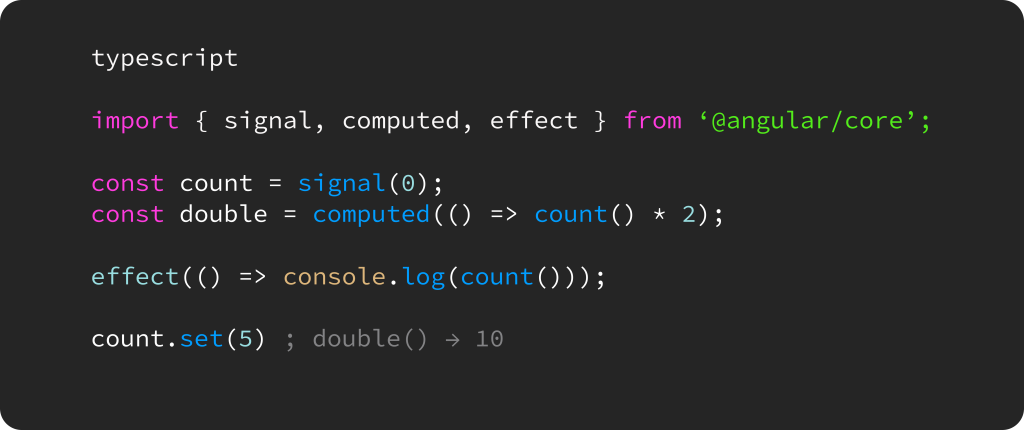
Signals in practice
The three core primitives cover most use cases:
- signal(), which holds a value you read by calling it as a function and update with .set() or .update()
- computed(), which derives a new value from one or more signals and stays in sync automatically
- effect(), which runs a side effect whenever a signal it reads changes
What RxJS is
RxJS treats data as streams, much like a plumbing system where data flows through pipes. You can filter bad events, merge multiple sources, map values, and debounce — very powerful, but complex plumbing gets hard to reason about quickly.
The core RxJS concepts are:
- an Observable, which is a stream of future values or events over time;
- an Observer, which listens to the stream;
- a Subscription, which is the active connection between the two;
- Operators, which transform, filter, or combine streams;
- a Subject, which acts as both Observable and Observer at the same time.
How Signals and RxJS compare
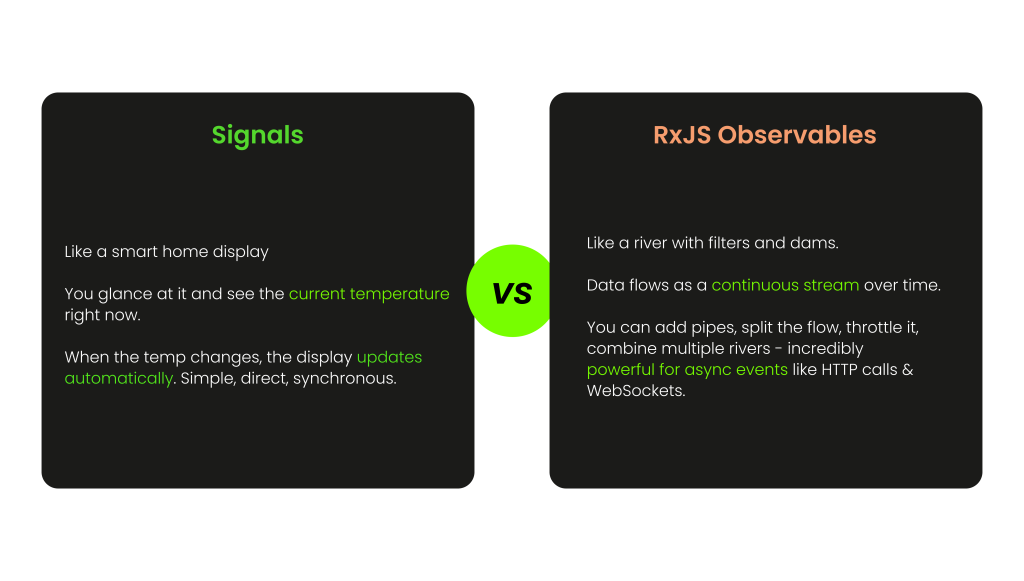
RxJS was designed for data that changes over time. It handles continuous streams where you can split the flow, add pipes, combine multiple sources, and control timing with operators. HTTP requests, WebSocket connections, and complex async logic still belong there. That power comes with a real cost: a large library of operators to learn, subscriptions to manage, and memory leaks waiting to happen when teardown logic gets missed.
Each tool has a clearly defined lane. Signals own the synchronous, UI-state side of an Angular app, while RxJS owns the async, event-driven side.
Why migrate to Signals
For Angular developers working in RxJS-heavy codebases, most of these benefits will feel familiar as solutions to problems they’ve already run into.
Less boilerplate
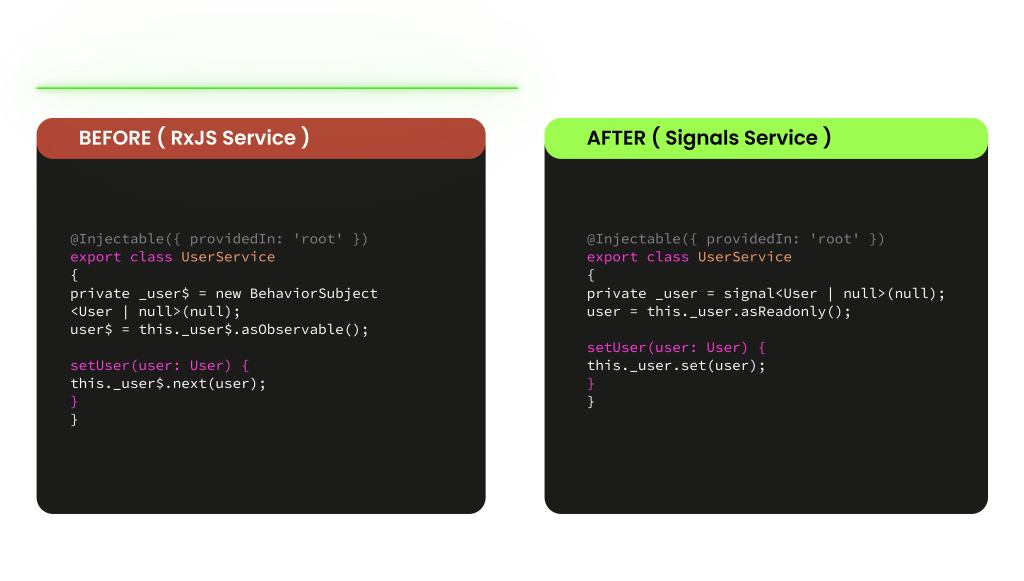
Signals eliminate the subscribe/unsubscribe cycle entirely. No more managing subscriptions manually, no more memory leaks from cleanups that got forgotten along the way.
Better performance
Rather than triggering broader re-renders, the framework gets precise information about what changed and updates only the components that actually depend on that value.
Easier to read
The code reads like plain variables. A developer joining a project doesn’t need to understand an Observable chain to follow what a component is doing.
Interoperable
Type safe
The future of Angular
The framework is investing heavily in Signals, and getting familiar with them now puts you ahead of where Angular is going rather than catching up to it later.
How to approach the migration strategy
Signals and RxJS coexist in the same app without any issues, which means the transition can happen gradually, at whatever pace makes sense for the codebase. Trying to migrate everything at once is the fastest way to introduce bugs. A step by step approach works better:
1.Start with new components
Any new component state gets written with Signals from the start, while existing RxJS code stays untouched. It’s the safest way to get comfortable with the API before touching anything already working in production.
2. Replace BehaviorSubject
3. Bridge HTTP calls with toSignal()
4. Update templates
5.Keep RxJS where it belongs
WebSockets, complex merges, and retry logic stay with RxJS. The goal of migration isn’t to eliminate it but to use each tool where it actually fits: Signals for state, RxJS for streams.
Bridging the gap between Signals and RxJS
Common pitfalls to avoid
Working with Signals is straightforward once the mental model clicks, but a few things tend to trip developers up early on:
- Forgetting to call Signals — write count() not count in templates.
- Using effect() too eagerly — prefer computed() for derived values, use effect() only for DOM side effects.
- Using Signals for async data — for HTTP and WebSockets, still use RxJS with toSignal().
- Mutating signal objects directly — never mutate arrays or objects inside a signal directly, use .set() or .update().
- Over-migrating at once — incremental migration is safer. Mixing Signals and RxJS in the same app is fine.
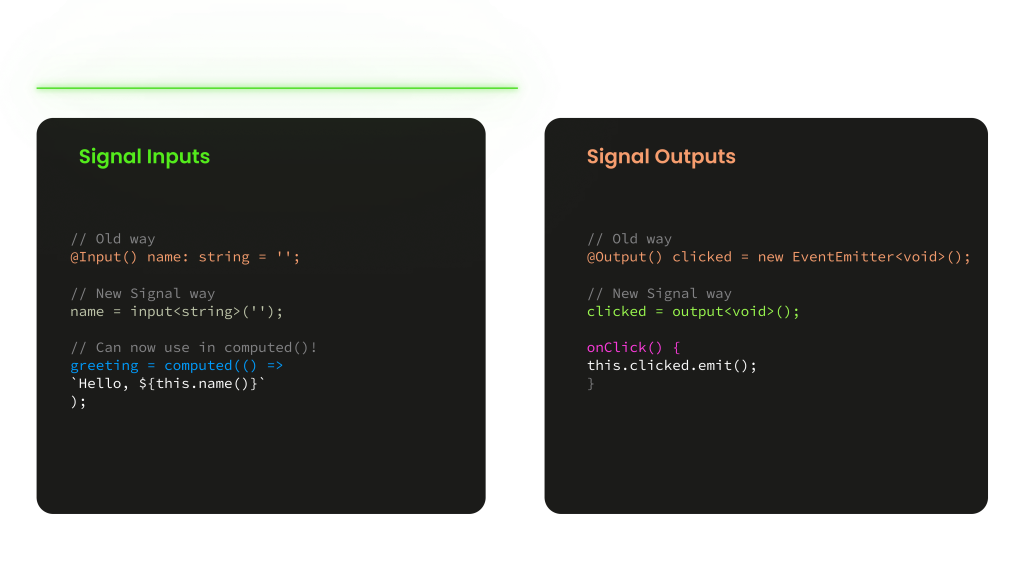
- Ignoring input() signals — component inputs can now be Signals too. Use input() for a more modern approach
Now that we’ve covered the most common pitfalls, let’s look at how Angular 17 introduced a set of changes that take Signals even further into the component API itself.
Signal Inputs and Outputs in Angular 17
Where to go from here
Signals fit into an existing Angular codebase without asking for a complete rewrite. They work alongside RxJS, cover the parts of state management where RxJS was always overkill, and make the code easier to follow for everyone on the team. The migration can start with a single service and grow from there, at whatever pace the project allows.
Insights by Stefan Claici, Senior Frontend Developer